
Antidetect browser · macOS & Windows

Like a ghost.
Undetectable.

Spectre runs isolated Chromium profiles — each with its own fingerprint, proxy and storage. Run your whole squad of accounts side by side, on your machine, under your control.

Invite-only early access · No cloud account

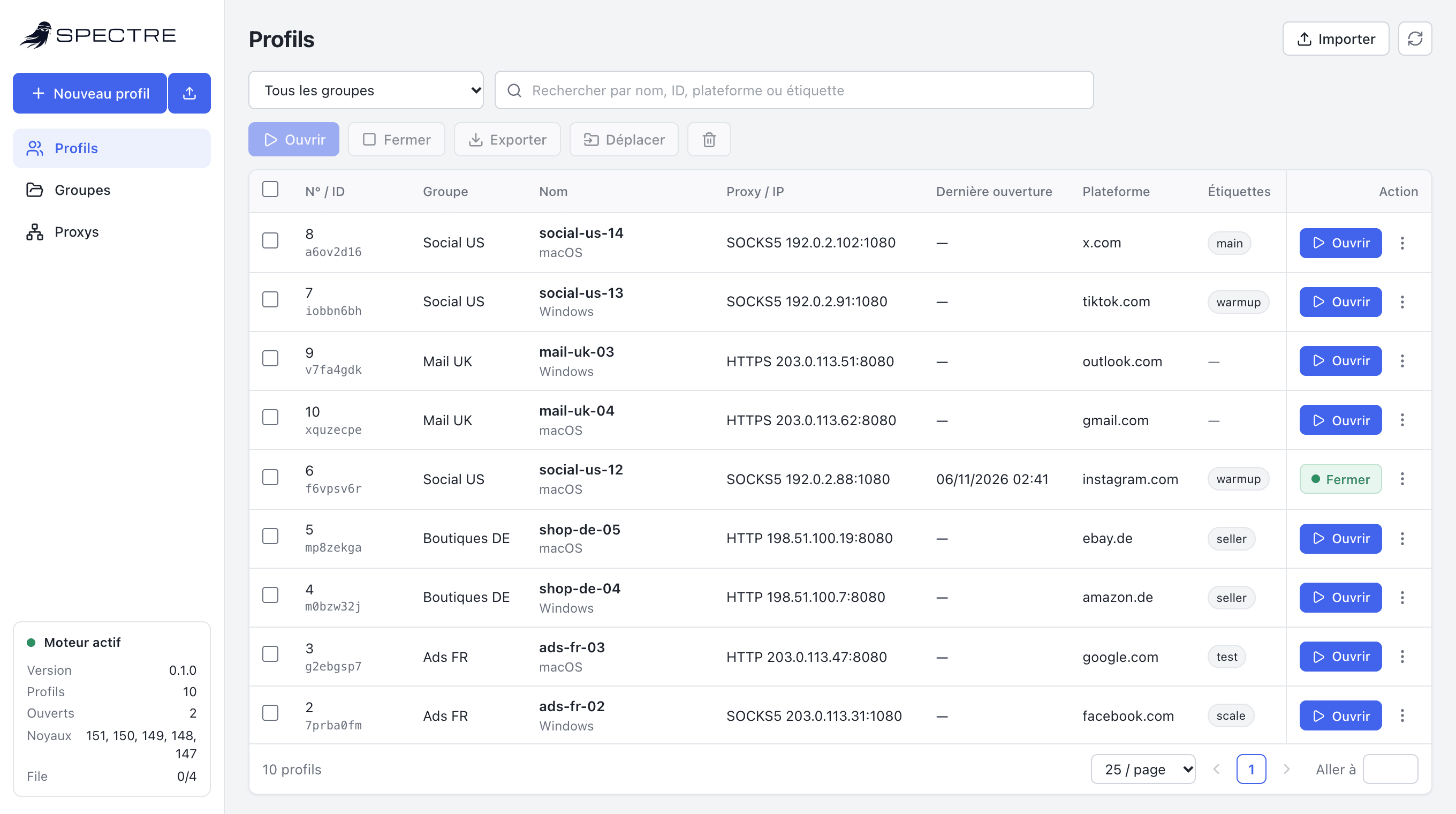
Spectre profile manager: ten profiles across four groups, each with its own proxy and platform, two of them running.
Native Chromium 159source-built engine · native profile controls
HTTP · HTTPS · SOCKS5authenticated proxies, multi-hop chains
Local APIAdsPower-compatible endpoints
0 cloudprofiles never leave your machine

01 Radar

Detectors look
for contradictions.

Spoof one signal and miss the one next to it, and the profile is flagged. Spectre keeps every signal consistent with the others.

Scanning

    Illustrative scenario of common mismatches. Not a measurement of any specific product.

    02 Loadout

    Built to keep accounts apart.

    Each profile looks like its own device. Nothing crosses over: not cookies, not storage, not the network path.

    01

    A coherent fingerprint per profile

    Canvas, WebGL, audio, client rects, screen, hardware and user agent are configured natively per profile — stable across launches, with isolated storage and a dedicated proxy route.

    Platform
    MacIntel
    Engine
    Chromium 159.0.8147.0
    Screen
    2560 × 1440 @2
    Hardware
    12 cores · 8 GB
    WebGL
    ANGLE · Apple M2
    Timezone
    from exit IP

    02

    A proxy per profile

    HTTP, HTTPS or SOCKS5 with credentials, handed to the engine itself. Timezone and language follow the exit IP.

    03

    Isolated storage

    Cookies, local storage and sessions persist per profile. Close it tonight, reopen it tomorrow, still signed in.

    04

    Groups & bulk actions

    Sort hundreds of profiles by group, search across all of them, then open, close, move or export a selection at once.

    05

    Import & export

    Move profiles with their configuration and saved cookies. An import never overwrites an existing profile or seed.

    03 Recon

    Check a profile before it goes out.

    A fingerprint is many answers — navigator, WebGL, WebGPU, workers, fonts, the clock, the network. Detectors look for two of them disagreeing. spectre audit reads them all off the live browser and reports every contradiction.

    • Page, worker and iframe compared side by side
    • Exit IP geolocated against timezone and language
    • Optional BrowserScan pass with its score
    $ spectre audit social-us-12 --scan
    profile social-us-12: Chrome/151.0.0.0 · Macintosh
      MacIntel · fr-FR, en-US · Europe/Paris · 2560×1440@2
      12 cores · 8 GB · WebGPU apple/metal-3
      exit 203.0.113.24 (FR, Europe/Paris)
      no contradiction found
      BrowserScan 100%
    Sample output from a test profile.

    04 Deploy

    Three steps to a new identity.

    1. 01

      Create

      Name a profile. Spectre deals it a fresh seed and a coherent device to match.

    2. 02

      Arm

      Attach a proxy. Timezone, language and geolocation align with its exit IP.

    3. 03

      Launch

      Open it in its own Chromium window — or start it from your scripts over the Local API.

    05 Extraction

    Switching from AdsPower takes a port number.

    The Local API follows AdsPower’s endpoints and response format, so Puppeteer, Playwright and Selenium scripts keep working. Spectre can pull your existing profiles from a running AdsPower engine — without overwriting anything it already holds.

    // before: AdsPower
    const api = "http://127.0.0.1:50325";
    // after: Spectre
    const api = "http://127.0.0.1:50345";
    
    const url = `${api}/api/v1/browser/start?user_id=${id}`;
    const { data } = await (await fetch(url)).json();
    await puppeteer.connect({
      browserWSEndpoint: data.ws.puppeteer,
    });
    Same endpoints, same response shape.
    ~/Library/Application Support/Spectre
    ├── spectre.sqlite
    ├── profiles/
    │   ├── ads-fr-01/
    │   ├── shop-de-04/
    │   └── social-us-12/
    └── logs/

    06 Silent running

    Your profiles never leave your machine.

    No sign-up, no sync server, no dashboard watching your accounts. Profiles, cookies and logs live in a folder you own; updates and uninstalls keep them.

    • Native app for macOS and Windows
    • Interface and API bound to your computer only
    • Requests from other websites are refused

    07 Briefing

    Questions.

    Can I download Spectre Browser today?

    Spectre Browser is in invite-only early access. Request access and we will get back to you with an invitation.

    Which systems are supported?

    macOS on Apple Silicon and Windows 64-bit.

    I use AdsPower. Can I switch?

    Yes. The Local API follows AdsPower’s endpoints, so most automations only need the new port, and existing profiles can be imported from a running AdsPower engine.

    Which browser engine does Spectre run?

    Spectre runs its own source-built Chromium 159 fork with native profile patches, not a renamed SunBrowser binary or JavaScript fingerprint injections. Each engine payload includes its source revision, patch hashes, executable checksum and Chromium third-party notices.

    Do you store my profiles or cookies?

    No. Everything stays on your computer. There is no account and no cloud copy.

    How much does it cost?

    Pricing will be announced at launch. Early-access members hear about it first.

    08 Enlist

    Join the squad.

    Tell us how many profiles you run and what you automate. Invitations go out in small batches.

    Request access

    or write to access@spectrebrowser.com